
AI OPERATIONS / NICKE STUDIO GUIDES
Human in the loop AI: where review belongs in a workflow
Design human review into AI workflows with clear permissions, useful evidence and escalation rules. Avoid approval queues that add work.
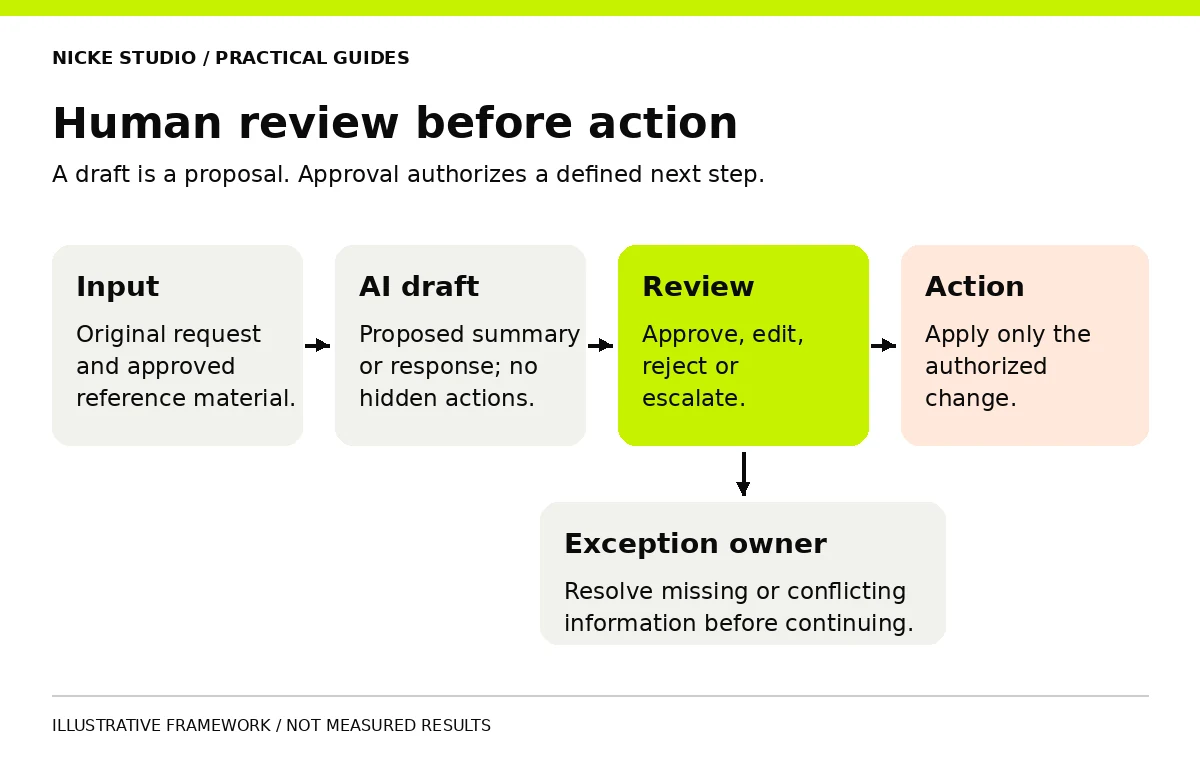
Human in the loop AI places a person inside an AI-assisted process to review, correct or authorize part of the work. The useful question is where that intervention belongs and what the reviewer needs to make a decision. Adding an approval button alone does not create meaningful oversight.
For a business workflow, good review connects authority, evidence and time. A person should understand the proposed action, be able to challenge it and have a workable path to edit, reject or escalate it.
Separate drafting from permission to act
An assistant that drafts a response has a different operating boundary from one that sends the response, changes a booking or modifies a customer record. Define those permissions separately, even when a single interface presents them together.
A practical starting point is to let AI prepare a draft while a person authorizes consequential changes. You can later evaluate whether limited actions are reliable enough for a different review model. That decision should be supported by workflow evidence, rather than confidence in the demo.
| Work step | A possible review arrangement | What must be clear |
|---|---|---|
| Draft an internal summary | Reviewer corrects before use | Source material and missing information |
| Prepare an external reply | Approval before sending | Recipient, claims and final wording |
| Update a business record | Approval for specified fields | Previous value, proposed value and record identity |
| Handle an exception | Escalation to a named owner | Reason, relevant evidence and next action |
These are starting points for design, not universal rules for every industry or use case. Increase scrutiny when mistakes are harder to reverse or carry greater consequences.
Give the reviewer enough context
A screen that shows only the generated answer encourages approval without investigation. Show the original request, the reference material used and the proposed change. Make missing evidence visible instead of hiding it behind fluent wording.
For a draft service reply, a reviewer may need the customer's request, the current service catalogue and a clear indication that the price has not been confirmed. For a CRM change, show the exact record and field values before and after the action.
Microsoft Research's Guidelines for Human-AI Interaction address expectations, correction and user control. In a review queue, apply those principles by making limitations understandable and corrections practical.
Design four real actions
Give reviewers a way to approve, edit, reject and escalate. Record what each action means. Rejecting an output should not silently trigger another version that bypasses the same concern. Escalation should reach someone with the authority to resolve it.
- Approve: accept a specific output and its defined action.
- Edit: change the output and preserve the approved final version.
- Reject: prevent the proposed action and record the reason.
- Escalate: route uncertainty to a named owner with context.
Avoid generic approval that authorizes several hidden actions. If approving a reply also creates a booking or updates a price, the reviewer needs to see those consequences before deciding.
Plan the queue, including busy periods
Review is work. Estimate incoming volume, typical handling time and the rate of difficult cases. Decide what happens outside business hours and when the assigned person is absent. A queue with no backup owner can turn a fast drafting system into a slow customer experience.
Measure the age of pending items as well as average review time. A small number of requests waiting for days can matter even when the average looks acceptable. Use a clear pending state; avoid displaying an automated acknowledgement as if the business has completed its review.
Human oversight needs capacity and authority. A person who can only click approve is not being given much control.
For the system connections behind the queue, see the AI integration strategy guide.
Define escalation conditions explicitly
Do not rely solely on a model-generated confidence label. Test whether any confidence signal actually relates to correctness for the task. Straightforward operating rules can provide additional boundaries: missing required fields, an unrecognized service, conflicting documents or an unavailable destination system.
- Route requests outside the documented scope to an owner.
- Pause actions when source information is missing or contradictory.
- Require fresh approval if a proposed action changes materially.
- Retain a useful history of who approved what and when.
Logs should support investigation without collecting unnecessary information. Decide which details are needed to reproduce a problem and who can see them.
Evaluate the human and AI process together
Measure the quality of the final result, the correction effort and the time until completion. A high draft acceptance rate can hide careless review, while a low rate may reveal a poor fit between the model and the task. Inspect examples rather than treating a single number as proof.
| Signal | A question worth investigating |
|---|---|
| Approvals are almost instant | Is review easy, or are people approving without checking? |
| The same field is repeatedly corrected | Are instructions or source data wrong? |
| Escalations remain unresolved | Is ownership unclear or capacity insufficient? |
| Review time exceeds the baseline | Does the workflow need a narrower task? |
Use an AI proof of concept to test the combined workflow before wider use. Include examples where rejecting the output is the correct outcome.
A practical example
Imagine a hypothetical assistant preparing replies to home-service inquiries. It can summarize the request and draft a question about missing details. It cannot promise a booking time or final price. A coordinator sees the inquiry, edits the draft and authorizes the reply. Requests outside the service area go to the operations owner.
The design is useful because its boundaries are concrete. If the business later adds booking permissions, that change needs its own tests and approval design. This is an illustrative workflow, not a reported client deployment.
Frequently asked questions
Does every output need review?
That depends on the task, evidence and consequences. Start with explicit boundaries and test the review arrangement. Routine internal tasks and externally binding actions should not automatically share the same permissions.
Can review prevent every mistake?
No. Reviewers can miss errors, especially under time pressure. Clear evidence, correction tools, manageable queues and sampling can help the team detect problems; they do not establish perfect accuracy.
Who should own the process?
Someone responsible for the business outcome, supported by a technical contact for failures. The person who purchased the software is not necessarily the right reviewer.
Return to the AI agency guide for procurement questions, or discuss a review workflow with Nicke Studio.