

AI ENGINEERING / NICKE STUDIO GUIDES
AI integration strategy: connect tools without losing control
Map data ownership, validation, retries and permissions when connecting AI to your CRM and business tools. Start with one reliable integration.
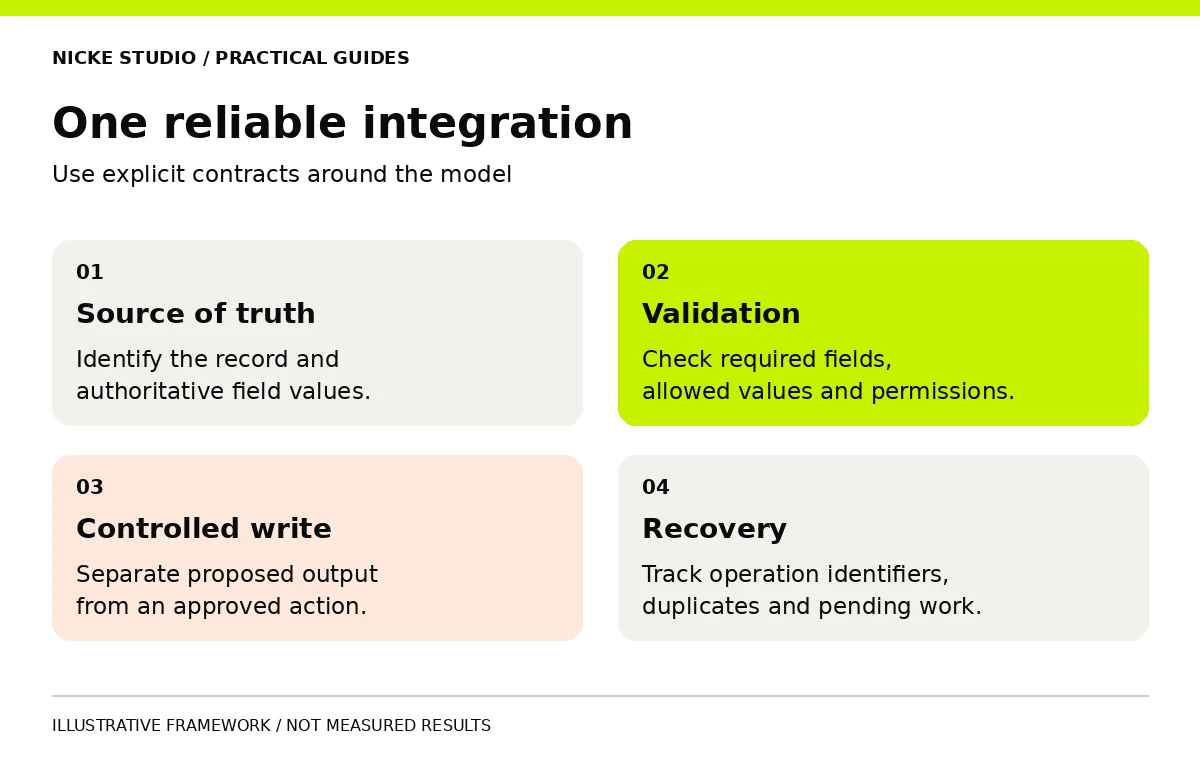
An AI integration strategy defines how AI exchanges information with the systems a business already uses. It identifies the source of each fact, the actions permitted, the validation required and the recovery path when something fails. The model is one component in that plan, alongside ordinary application logic and human decisions.
Start with one complete transaction: an inquiry arrives, useful information is prepared, a reviewer checks it and the approved result reaches the correct record. This is easier to test than connecting every available tool at once.
Identify the source of truth
Choose an authoritative system for each important field. A CRM may own contact details, a scheduling tool may own availability and an approved catalogue may own service descriptions. Avoid letting an AI-generated summary silently replace the original information.
Write down the record identifiers and update rules. If two systems hold different phone numbers, the integration needs a policy for resolving the difference. Asking the model to choose whichever looks plausible does not establish data ownership.
| Information | Possible authoritative source | A boundary to document |
|---|---|---|
| Customer contact details | CRM record | Which fields another system may update |
| Appointment availability | Scheduling platform | Whether the workflow reads or reserves slots |
| Service descriptions | Approved catalogue | Who can publish a new version |
| Draft summary | AI-assisted workflow | It must remain traceable to the original request |
The exact choices depend on your systems. The objective is to remove ambiguity before creating connections.
Define the interface before the AI prompt
An interface contract explains which fields enter and leave a step, their permitted values and how failures are represented. For an inquiry, that could include a request identifier, location, selected service and a status such as needs review.
Keep required fields distinct from optional ones. Use a defined empty or unknown state when information is unavailable. A model should not fill gaps with plausible values merely to satisfy a destination form.
The OpenAPI Specification provides a standard way to describe HTTP API interfaces. Whether you use OpenAPI or a simpler field mapping document, make the contract explicit enough for another developer to understand and test.
Validate before a write occurs
Receiving well-formed JSON does not establish that the contents are correct. Check structure, allowed values, record identity and business rules before a write. Keep validation logic outside the model where the rule is deterministic.
- Confirm required fields and permitted service categories.
- Check that the destination record is the intended one.
- Reject unsupported values rather than silently rewriting them.
- Keep a clear difference between a proposed update and an approved update.
For instance, if AI extracts a location that the business does not serve, the system can route the request to a person instead of creating a false service commitment. For approval design, see human in the loop AI.
Make retries safe
Network requests can time out, and the same event can arrive more than once. A retry should not create duplicate bookings, records or messages. Use a stable identifier for the business operation and a record of whether that operation has already completed.
This is often called idempotency: repeating the same operation has the intended effect once. AWS's Lambda best practices recommend idempotent code to handle duplicate events. The same design concern applies to many webhook and automation workflows, even when they do not use Lambda.
Also test partial failure. The destination may accept a change while the response never reaches your workflow. Blindly starting the entire transaction again can cause a second action. Check the destination state or the operation record before repeating a consequential step.
Design an exception path
An exception should produce a visible item with an owner, a reason and a recovery action. A hidden error log is useful for debugging, but it may not tell the operations team that a customer request is waiting.
| Failure | Useful behavior | What to avoid |
|---|---|---|
| Required information is absent | Ask for details or send to review | Inventing missing values |
| Destination is unavailable | Queue with bounded retries and visibility | Endless silent retries |
| Event arrives twice | Check the operation identifier | Creating another record automatically |
| AI response fails validation | Keep the original input and route to review | Passing invalid output downstream |
Decide how long a request can remain pending and who receives an alert. Document how to resume without repeating completed actions.
Use limited access and staged rollout
Give the integration only the access it needs. A system that drafts summaries may need read access to reference material without permission to delete records or send messages. Separate test and production credentials, and keep secrets out of prompts and ordinary logs.
Begin with a read-only or shadow stage where practical: the workflow proposes results without applying them. Then test a small set of approved writes. Expand only after the team can explain the failures and operate the recovery path.
A connection is ready when the team can identify what happened, what failed and how to recover without duplicating the work.
Test the complete transaction
The AI proof of concept may have established that a model can extract the required information. Integration testing must also establish that the information reaches the right system and that the surrounding controls work.
- Run a complete routine case from source to destination.
- Repeat the same event and inspect the destination for duplicates.
- Remove a required field and verify the review path.
- Simulate an unavailable destination and inspect pending-state visibility.
- Test a user or credential without permission for the action.
- Check what happens when an approval is rejected or expires.
Use approved test records and prevent tests from contacting real customers. Record the expected result for each scenario before execution.
Plan ownership after launch
Assign someone to monitor pending items, review usage and coordinate changes when an API or business rule changes. Retain field mappings, configurations and recovery instructions. Test that an authorized backup can operate the workflow without relying on the original implementer's memory.
Do we need a custom application?
Not always. Existing automation software can suit a bounded workflow. Evaluate whether it supports the validation, access controls, visibility and exports the process needs.
Should every step use AI?
No. Use ordinary logic for predictable rules and reserve AI for tasks where interpretation adds value. This can make the workflow easier to test and maintain.
How do we keep the connection portable?
Keep business rules, record mappings and test cases documented outside a provider-specific prompt. The AI vendor lock-in guide explains how to test a replacement path.
For a broader supplier brief, return to the AI agency guide. Contact Nicke Studio to discuss one integration with a defined handover.